
Chat with Everyone on a Ticket
While someone is working a ticket, In Progress or in PSR, anyone who can see the ticket can chat about it with everyone else involved. Ask the technician how it is going, pass on what the customer just said on the phone, or offer help on a problem you have seen before, without writing an internal note.
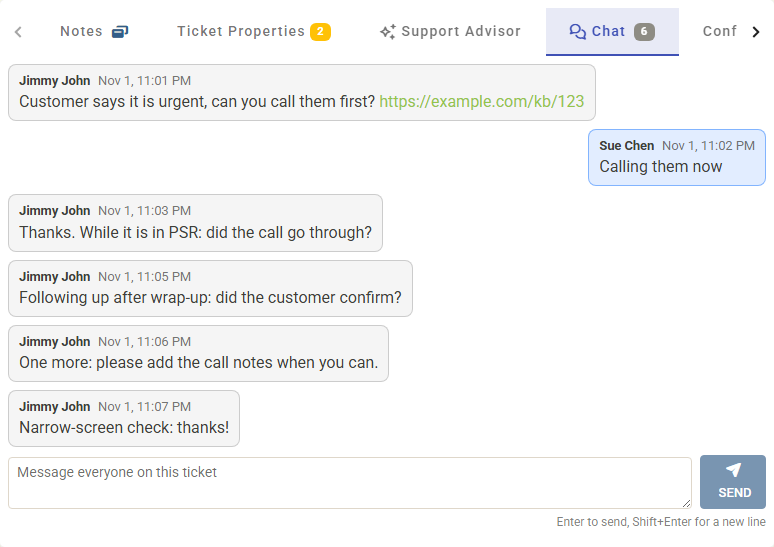
- Technicians find the Chat tab next to Support Advisor on the ticket they are working. On a narrow screen it is the Chat button in the bar above the working notes.
- Everyone else opens the ticket from the list or the availability board and chooses its Chat tab, right after Support Advisor. Choosing Work on Ticket on a ticket someone else is working now offers Chat too, so you can check in before joining.
A new message opens the chat straight away for everyone in the conversation, with a sound. On your own working ticket the side panel switches to Chat and whatever you are typing in Working Notes keeps its place; anywhere else in MTX a Ticket Chat window opens over the screen. Messages from several tickets share one window, with a tab per ticket, and Open Ticket takes you to the ticket’s summary.
The conversation belongs to the ticket, not to people, so there are no @mentions. Everyone working the ticket is in it, along with anyone who has posted and anyone who was working the ticket when a message was posted. They all stay in the conversation after their work ends, so a follow-up question after wrap-up still reaches the technician.
A chat can be started only while the ticket is being worked. After that it stays open: the conversation is kept with the ticket, anyone can read it and add to it from the ticket’s Chat tab, and it continues the next time someone works the ticket. Chat messages are kept in Nilear only. They are never added to the ticket’s notes, a time entry, AI note polishing or ConnectWise.