
Open and read a map
On the Maps page, click a map’s name or Open. The map fills the window, with its details in cards on the left.
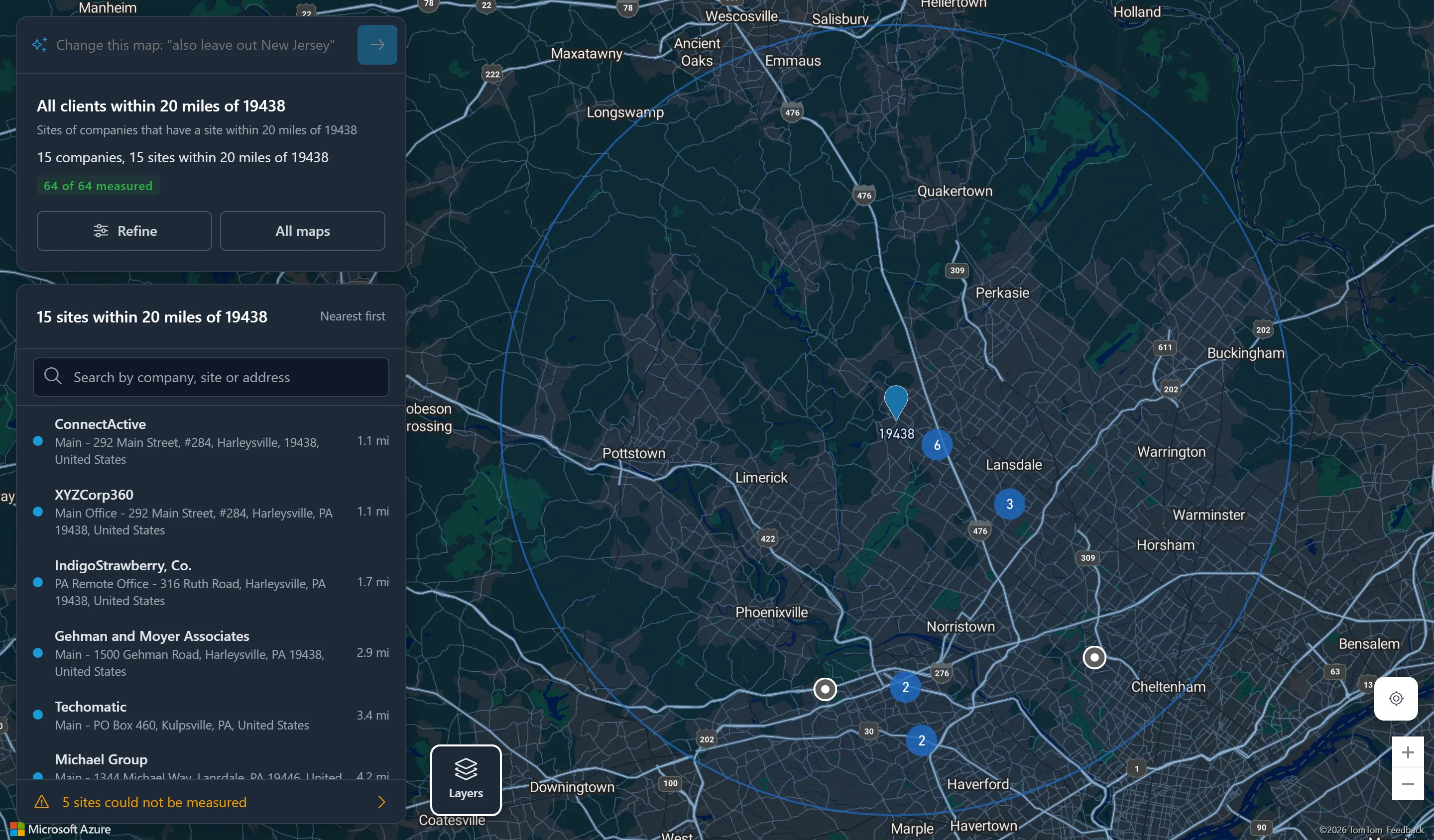
The summary card
Section titled “The summary card”- Change this map: a box to change the map in a sentence.
- The map’s name, and its criteria in plain words.
- The counts: companies and sites, or, with a distance, the companies and sites within it.
- How many sites are located (or measured, with a distance). Pins appear as sites are located.
- Refine to change the map in place (how), and All maps to go back.
A condition that matches nothing because its value has gone from ConnectWise is shown in red.
The sites list
Section titled “The sites list”Each row names the company, the site and its address. Choose a row to bring its pin into view and open it; choose a pin to mark its row. In a cluster of pins, choose the row and the map zooms in to the pin.
- A map without a distance lists sites By company; a distance map lists them Nearest first, with each one’s distance.
- With more than 10 sites, Search by company, site or address narrows the list as you type, matching every word, ignoring case and accents. The pins and counts do not change. Press Escape or Clear the search to show every row.
- sites could not be located (or measured) at the bottom opens the sites whose address could not be found, with the reason for each.
Layers
Section titled “Layers”Click Layers at the bottom left to switch on:
| Layer | Shows |
|---|---|
| Our offices | Your company’s office locations, each with the members who work there. |
| Team homes | Your members’ homes. A home marked private is shown only to your company’s Admins. |
| On-sites needed | Open tickets waiting for an on-site visit. How |
| Scheduled on-sites | On-site visits already scheduled. How |
| Road / Satellite | The map style. |
Each layer switched on gets a tab of its own beside Sites, listing its points; choose a row to go to it. At the bottom right, the location button shows where you are, and the + and − buttons zoom.
Over 5,000 sites
Section titled “Over 5,000 sites”A map shows at most 5,000 sites. A map that matches more says This map matches n sites and draws no pins: narrow it, for example by a state or territory, a company type or status, an active agreement, or Show only each company’s primary site. Narrow this map opens it in the editor, if you may change it.
On a phone
Section titled “On a phone”On a narrow screen the cards become one sheet along the bottom: drag it up to see every site. The sentence box and Layers float at the top.
What you see is limited to your clients
Section titled “What you see is limited to your clients”Every count, pin and list shows only the companies your own ConnectWise access lets you see. Two people can open the same shared map and see different counts. See What each person sees.