
Set your availability
Your availability tells your team whether you are working a ticket, away, or off, and where you are working from. Most of it MTX keeps up to date by itself: while you work a ticket you show In Progress on it. You set the rest yourself.
Set your status
Section titled “Set your status”The Availability tab’s label shows your status. Click the status badge on it: the menu opens without leaving the tab you are on.
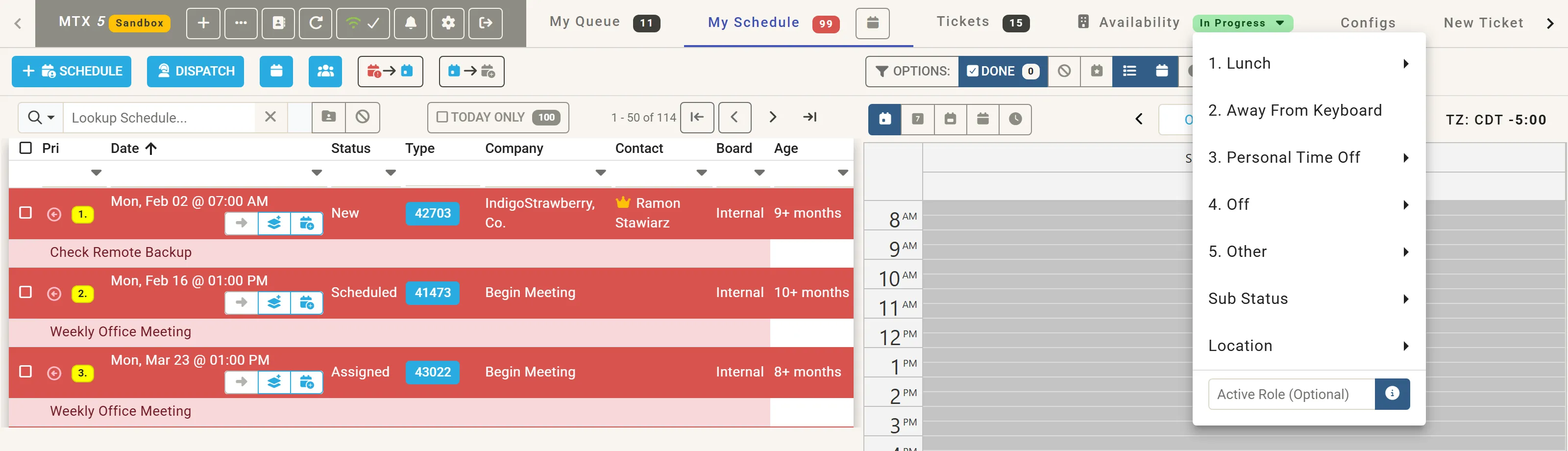
| Item | Sets |
|---|---|
| 1. Lunch | Lunch, back in 30, 45, 60 or 90 Minutes, or End of Day Lunch. |
| 2. Away From Keyboard | Away from your desk for a short while. |
| 3. Personal Time Off | Time off, of the kind you choose. |
| 4. Off | Off, of the kind you choose. |
| 5. Other | Another unavailable status, of the kind you choose. |
| Sub Status | A status shown alongside: Do Not Disturb, In Meeting, On Phone, Out-of-Office or @ Home Office. |
| Location | Where you are working from: Office, Home, On the Road, Remote or Other. |
| Active Role (Optional) | Your role for the day, when it differs from usual: for example “Shadowing”, “Sales Calls” or “Dispatcher”. |
The kinds under Personal Time Off, Off and Other are your company’s ConnectWise In/Out types; when there is only one, the item is named after it.
While you have a status such as Lunch or Away From Keyboard, the menu starts with I’m Back: choose it to end the status.
Your company may restrict who can change whose status. Everyone can always change their own.
See your team
Section titled “See your team”Select the Availability tab for the board of your team: each member’s status, work location and the tickets they are working.
- All Members, or one of your teams; Add Team creates a team of your own.
- Find a member narrows the board by name.
- The chips above the members count them by state (Working, Waiting, Inactive, Missing, On-site / Travel, Away, Off, Other). Click one or more to show only those members; Show all clears the choice.
How MTX works out each state is explained in Availability and work states.