
Split Tickets
Split Tickets “detects a ticket covering more than one issue and creates a separate ticket, if needed”. A customer who writes “two problems” in one email gets one ticket per problem, each with its own screenshots. You need the Admin access level to tick it.
Before you tick it: Manage Attachments
Section titled “Before you tick it: Manage Attachments”A split copies a moved issue’s screenshots to its new ticket, so your ConnectWise API member, the member whose keys connect Nilear to your ConnectWise, must be allowed to add attachments. When you tick Split Tickets, the Boards page first checks this, showing “Checking whether the API member may add attachments…”, and saves the tick only when it may.
If it may not, nothing is saved, the box stays unticked, and the board says Split Tickets cannot be switched on yet, naming the API member’s security role. To fix it:
- In ConnectWise, open System → Security Roles and the role named.
- Under Companies, find Manage Attachments and set Add Level to All.
- Back on the Boards page, click Check again. The tick is saved once the right is there.
View API Security Settings opens the page in Nilear’s account area that shows your API member’s security settings. If Nilear could not read the role at all, the board says so and why, for example because ConnectWise rejected the keys.
A board that was already splitting before the right was missing keeps its tick. Its expanded view then says: “Splits whose screenshots belong to a moved issue are left for a technician until the API member may add attachments.”
When it splits
Section titled “When it splits”Because nobody reviews an automatic split before it is made, its bar is high. Separate issues are separate problems: different products, systems, devices or services, or different problems for different people. These stay on one ticket:
- several symptoms of one fault;
- different aspects or cases of one problem or feature request;
- parts with one root cause, complaint or investigation, even when each touches a different component. They are left to the ticket’s tasks.
A doubtful case does not split. It also reads the ticket’s own screenshots, to decide which issue each one shows.
What it changes
Section titled “What it changes”In Live, for a ticket with two to four separate issues:
- It creates one to three new tickets, one per issue moving off the ticket. Each copies the original’s board,
company, contact, source and priority, with no Type, SubType or Item, and gets:
- a summary of its issue, within ConnectWise’s 100-character limit;
- its issue’s description, added as a note from the original’s contact;
- any work already done on that issue, as its internal analysis;
- the screenshots that show its issue;
- a note headed Nilear AI split this ticket from #original.
- It changes the original’s summary to the issue that stays on it, only when every new ticket was created.
- It adds a note to the original headed Nilear AI split this ticket, listing “Work moved to new tickets” and “Work remaining on this ticket”.
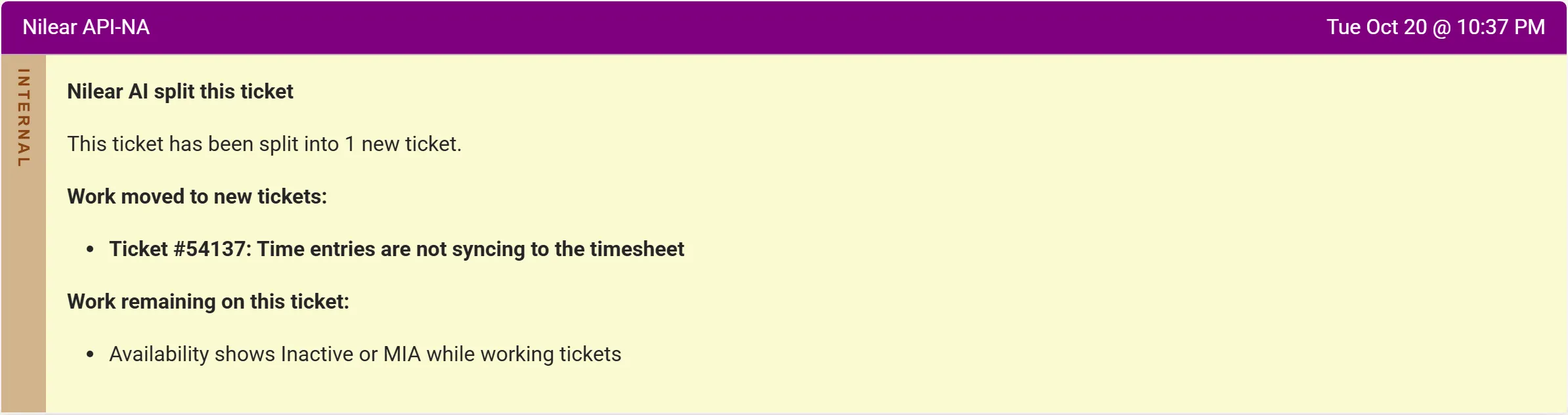
Each new ticket is then automated like any new ticket on the board, except that it is never split again and its summary is never polished. The original’s other automations judge it by the issue that stays: Assign Priority and Set TSI choose for that issue, Create Tasks proposes no task for an issue that moved, and Polish Summary is skipped.
In Preview, nothing is created or changed: the note describes each “proposed ticket” instead.
When it does nothing
Section titled “When it does nothing”- The ticket covers one issue, however long.
- It would need more than three new tickets: the split is left for a technician.
- A screenshot belongs to an issue that would move, and your API member may not add attachments: “A screenshot belongs to a separate issue, and the API member may not add attachments to copy it; left for a technician to split.”
- The ticket was itself created by a split.
If a new ticket cannot be created, the original keeps its summary and the note names the tickets that were created and says the others were not. A screenshot that cannot be copied stays on the original, and the new ticket’s note says so.
In the note
Section titled “In the note”The note’s first line lists 1 new ticket created (or “2 new tickets created”) in Live, or 1 new ticket in Preview, and Summary updated for the original’s new summary. Its bullet gives the original’s old and new summary, and each new ticket by number and summary.
Steer it with instructions
Section titled “Steer it with instructions”Write instructions for Split Tickets on Global Instructions or on the board (how). For example:
- “Do not split new-starter requests. A laptop, mailbox and licence for the same person stay on one ticket.”
- On an alerts board: “Never split alerts on this board, even when one alert lists several devices.”
A technician’s Split in MTX
Section titled “A technician’s Split in MTX”MTX’s Split button on a ticket is a separate tool a technician runs and reviews before anything is created. Its bar is lower: it may propose a split that Split Tickets would leave alone.