
Map Microsoft 365 licenses
A license mapping sets an agreement addition’s count from one Microsoft 365 license (subscription) of the client’s tenant, so license resale is billed as Microsoft bills you. It needs a Microsoft 365 or Partner Center source.
Map the licenses
Section titled “Map the licenses”- Open the company’s Agreements page and select Microsoft 365 Licenses (or SELECT under Microsoft 365 License Mapping on Overview).
- STEP 1: tick Enable Microsoft 365 License Sync.
- STEP 2: ConnectActive lists each license the tenant has. For each one:
- to bill it, choose its addition in Select Agreement Addition (or Create a New Agreement Addition) and set its options;
- not to bill it, such as a free license, tick Ignore this License (Do Not Sync with CW). Default to Ignore for all new companies ignores that license in every company you add later.
- When every license is mapped or ignored, click Perform Sync, check the counts on the Review Form and click COMMIT.
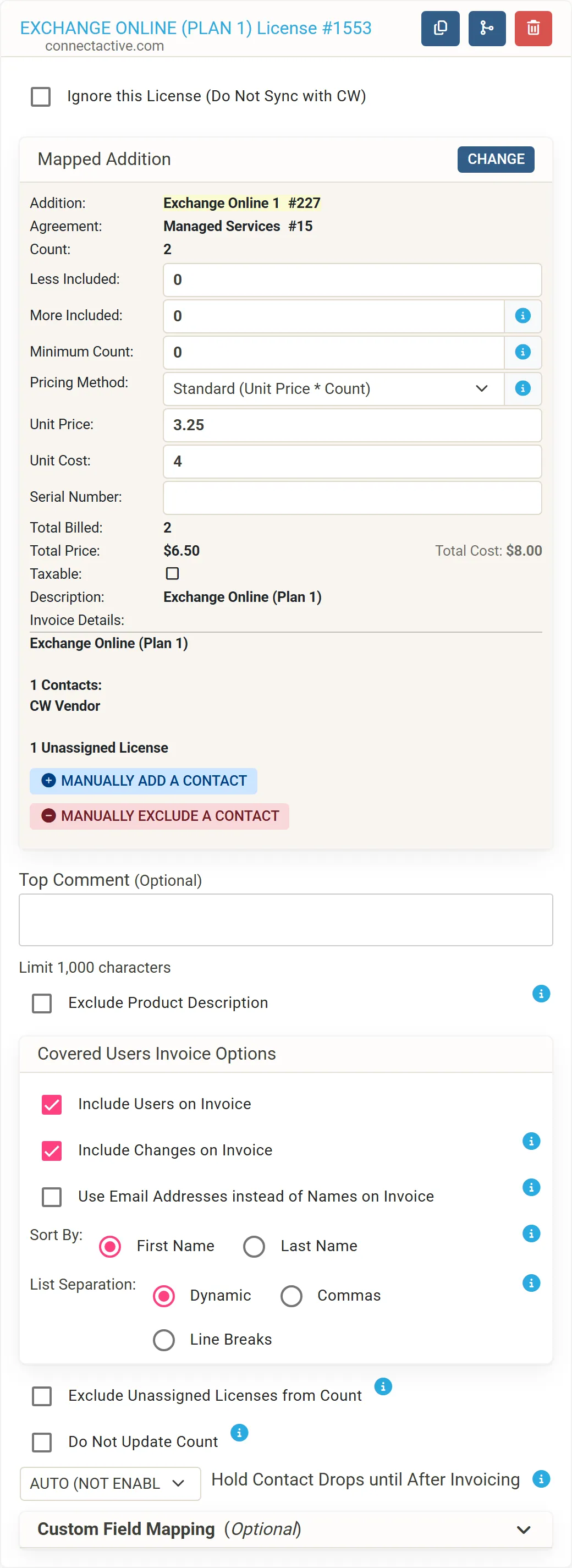
Every sync that finds a license change updates the additions; in most tenants a change starts a sync within minutes. The company list shows how many licenses are bought but not assigned, for example (1 Unassigned License).
What is counted
Section titled “What is counted”By default the count is the number of licenses the client has, assigned or not, because Microsoft bills every one. Options change that (Mapping options):
| Option | Effect |
|---|---|
| Exclude Unassigned Licenses from Count | Counts only assigned licenses. Microsoft still bills the unassigned ones. |
| Honor Agreement Off Flag | Leaves out users set to Off in the Matching Form’s Agreement column, such as an account of yours inside the client’s tenant. Microsoft still bills their licenses. |
| Limit to Filtered Users | Counts only users inside the company’s filter, for a tenant shared by several companies. |
| Minimum Count, Less Included, More Included | Adjust the count. |
Bill licenses without syncing contacts
Section titled “Bill licenses without syncing contacts”For a client to whom you only resell Microsoft 365, tick Do Not Sync Contacts, Just Update License Agreements in the company’s Sync Settings. ConnectActive then leaves the client’s contacts alone and only updates the license-mapped additions.
Related
Section titled “Related”- Several licenses on one addition, such as Microsoft 365 Business Standard and Microsoft 365 E3 as one “Managed Users” line: Combine groups or licenses.
- One license split across two offices’ additions: Split a mapping by OU.
- A worked example: Bill a Microsoft 365 license.