Projects Tab and Project Tabs
Projects now open in their own tabs in MTX, next to your ticket tabs. Click a project or phase on any project ticket, or pick a project from Project Management, and the project opens on its own tab with three views:
- Overview shows the project’s status, type, manager, dates, % complete, description, contact and site, with the hours and dates from ConnectWise. You can edit them and add, edit or delete project notes.
- Work Plan is the Work Plan you already know, with its phases and tickets.
- Team & Contacts lists the project’s team members and contacts, and lets you add, change or remove them.
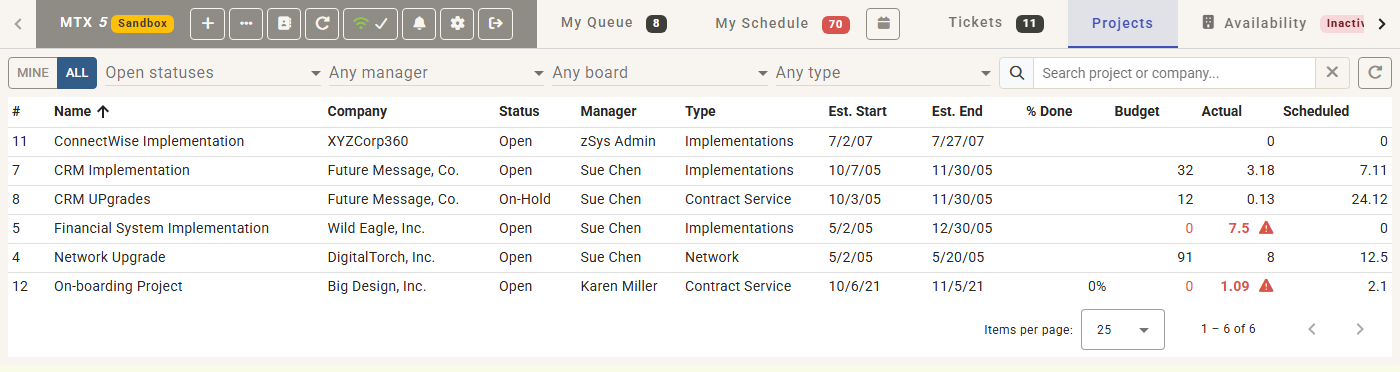
To browse every project, turn on Projects tab in MTX Preferences. The Projects tab lists the projects you manage or are on the team of. You can switch to all projects, include closed or on-hold ones, filter by manager, board or type, and see at a glance which projects are over budget.
What you can change follows your ConnectWise security role for projects, and ConnectWise tells you when it refuses something. If your role can’t look up projects, MTX doesn’t show project tabs.