Print a Ticket
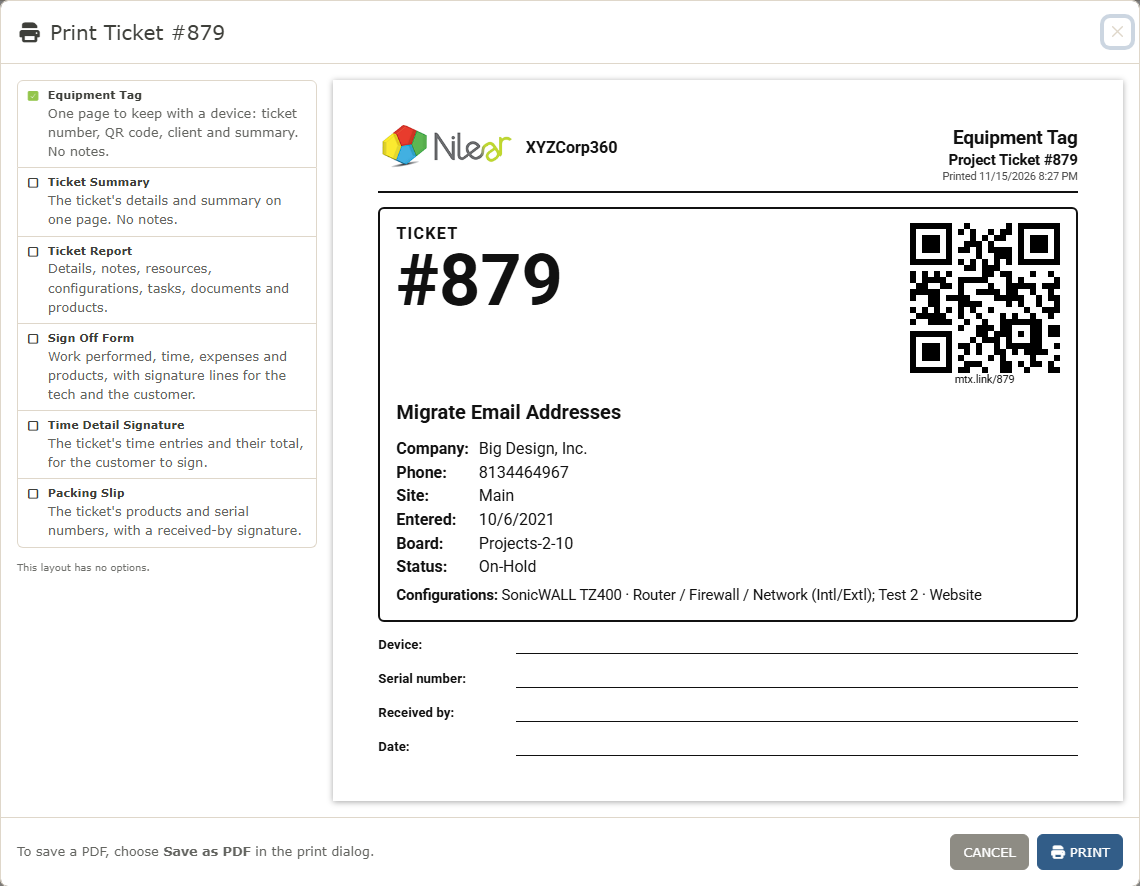
You can now print a ticket without opening it in ConnectWise. In the ticket summary, open the … menu and choose Print… (on a phone, it is in the More sheet). Pick a layout, check the preview, and click Print. To save a PDF instead, choose Save as PDF in your browser’s print dialog.
- Equipment Tag: one page to keep with a device you are working on. It shows the ticket number in large type, a QR code that opens the ticket in MTX, the client, contact, site and summary, and lines to write the device, serial number, who received it and the date. No notes.
- Ticket Summary: the ticket’s details and summary on one page, without notes.
- Ticket Report: the details, notes, resources, configurations, open tasks, documents and products, as ConnectWise’s Ticket Report prints them. Choose All notes, Customer-visible only or No notes, and whether to show prices.
- Sign Off Form: the work performed, billable time, expenses and products, with signature lines for the tech and the customer. Switch each section on or off and edit the sign-off text.
- Time Detail Signature: the ticket’s time entries and their total, for the customer to sign.
- Packing Slip: the ticket’s products, quantities and serial numbers, with a received-by signature. Uncheck any product that is not in this delivery.
MTX remembers the layout and options you used last on that device.