
Turn Your Working Notes into a Client Summary
No more switching between your Working Notes and the email to tell the contact what you did. Open the menu beside Polish on the email form and choose Client Summary. Nilear AI writes the email’s body from the ticket’s saved Working Notes, in the tone selected in that menu.
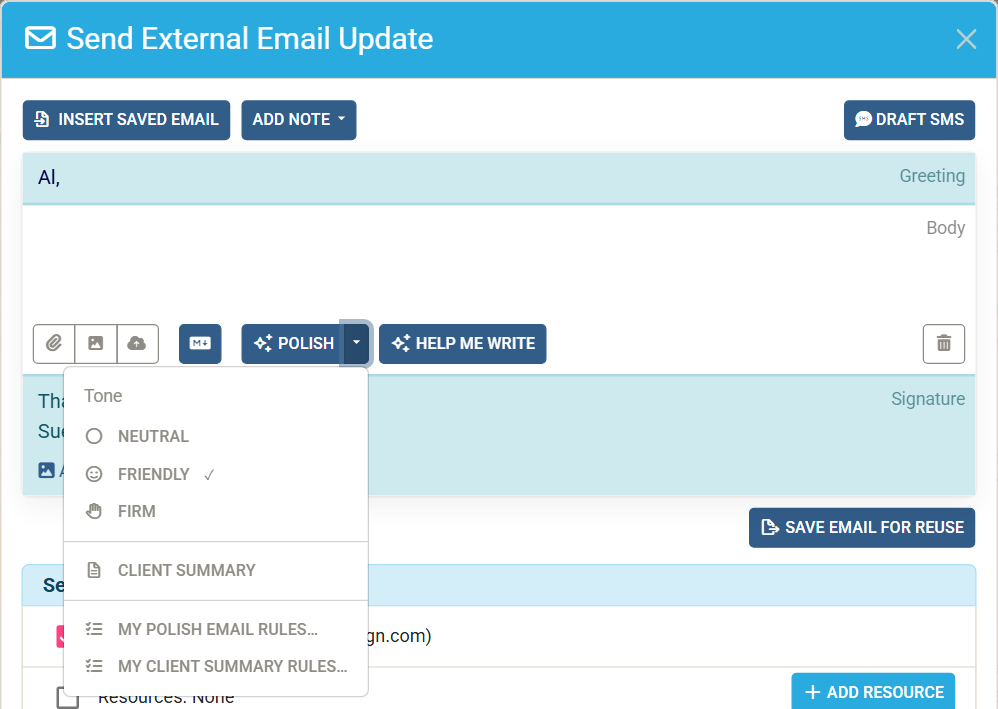
- Working Notes you marked Internal are never sent to Nilear AI.
- The summary opens in a preview first. Add to Email puts it after what you have written, Replace Email puts it in place of your text and keeps your attachments, with Undo for 15 seconds, and Insert into Email fills an empty draft.
- Your greeting and signature are added as usual, and nothing is sent until you send the email.
- Client Summary works on the Email step of a working session and in Send Email from a ticket’s summary. It does not need Support Advisor.
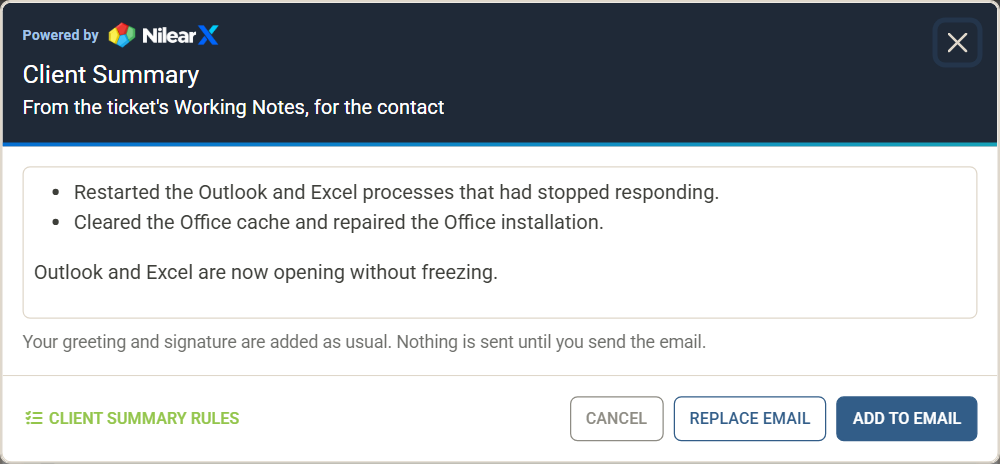
Tell it what to always include or leave out with Client Summary rules. Your company’s global rules apply to everyone, and administrators edit them. Each member can add personal rules from My Client Summary rules… in the same menu, or from Client Summary Rules on the preview. Your Polish Email rules also apply, for tone and style.