
Search Notes and Time Entries Across Tickets
The Tickets tab has a new view, Notes/Time Search. Choose it from the View menu, below Ticket Search, to find a word or phrase in the notes of every ticket you can see, written by anyone on your team.
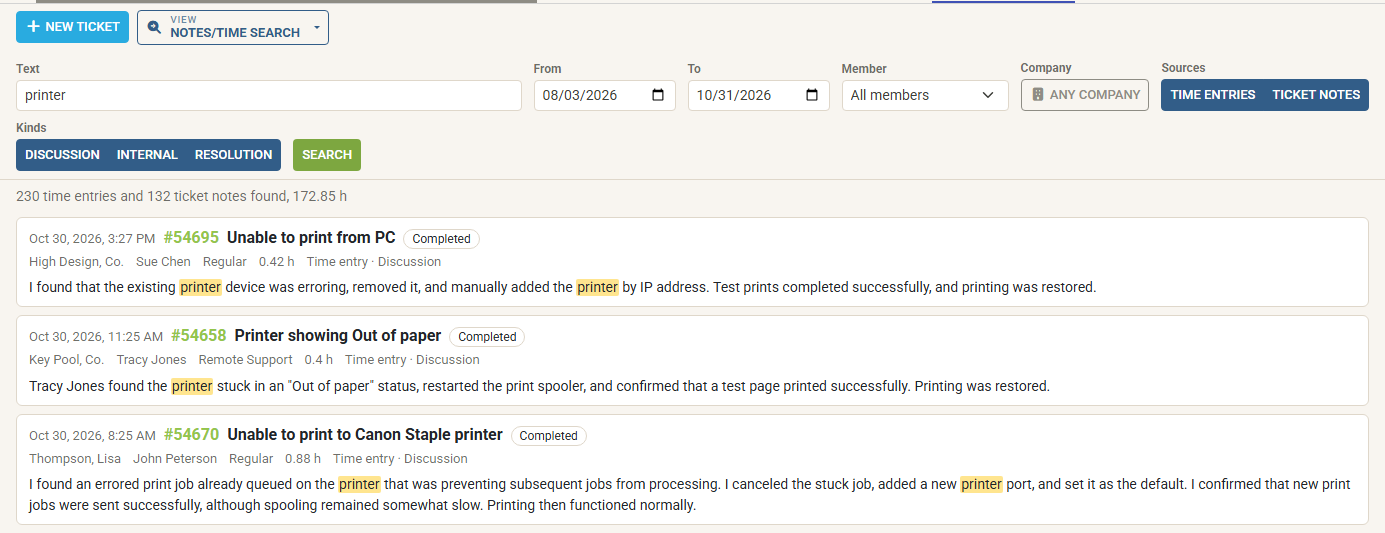
- What it searches. Time entries, including their internal notes, and ticket notes on service and project tickets. Narrow the search by Member, Company, Sources (time entries or ticket notes), Kinds (Discussion, Internal or Resolution) and Board Types: turn off Monitoring, say, to leave out alert tickets. Member, Sources, Kinds and Board Types are remembered for your next search.
- Any date range up to a year. The search starts with the last 90 days. Results appear as each two weeks are searched, newest first, and Stop ends a long search. A search ends at 500 results; narrow it to see more.
- Each result in full context. A result shows the ticket, its company and status, who wrote the note, the hours of a time entry, and the note’s text with every match highlighted.
- Open the ticket at the note. Click a result to open the ticket with the note in view and highlighted. Close the ticket to return to your results.
- From a ticket. In a ticket’s Notes tab, the Search other tickets’ notes and time button beside the notes search box opens Notes/Time Search for the same words, within the ticket’s company. The title and the results name the company, and Search all companies beside the results widens the search.
Notes on tickets in boards you cannot see are never shown or counted.