
Hide Duplicate Notes
A ticket’s Notes tab often showed the same text twice: once as a note and again in a time entry’s card, for example an email sent with its time entry. MTX now hides the note and keeps the time entry, so each piece of work is read once.
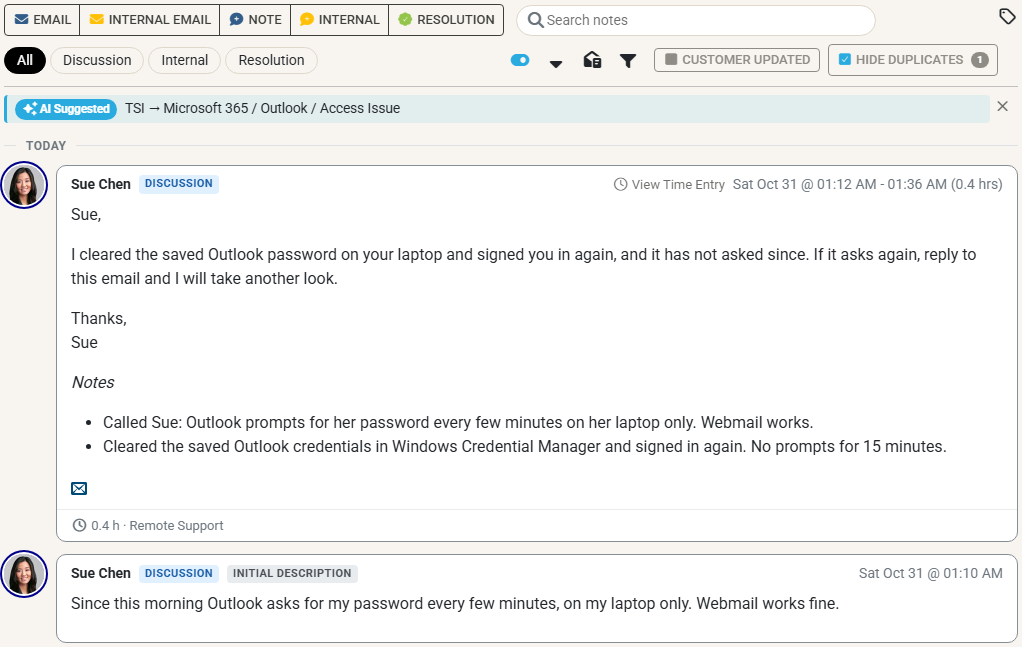
- What counts as a duplicate. A note by a member whose text is already in a time entry by the same member on the same ticket. Short notes, under 20 characters, must match the time entry’s text exactly. Contacts’ notes and time entries are never hidden.
- Only while the time entry is shown. If a filter, a kind chip or a search hides the time entry, the note is shown again.
- Show them for one ticket. Turn off Hide Duplicates beside Customer Updated in the Notes toolbar, or Duplicate Notes in the notes filter. The choice lasts for that ticket until you reload. Clear Filters hides them again.
- Turn it off. Turn off Hide duplicate notes in My Settings, on the Ticket Notes tab.
Nothing is changed or deleted, and the Notes tab’s count still counts every note.